
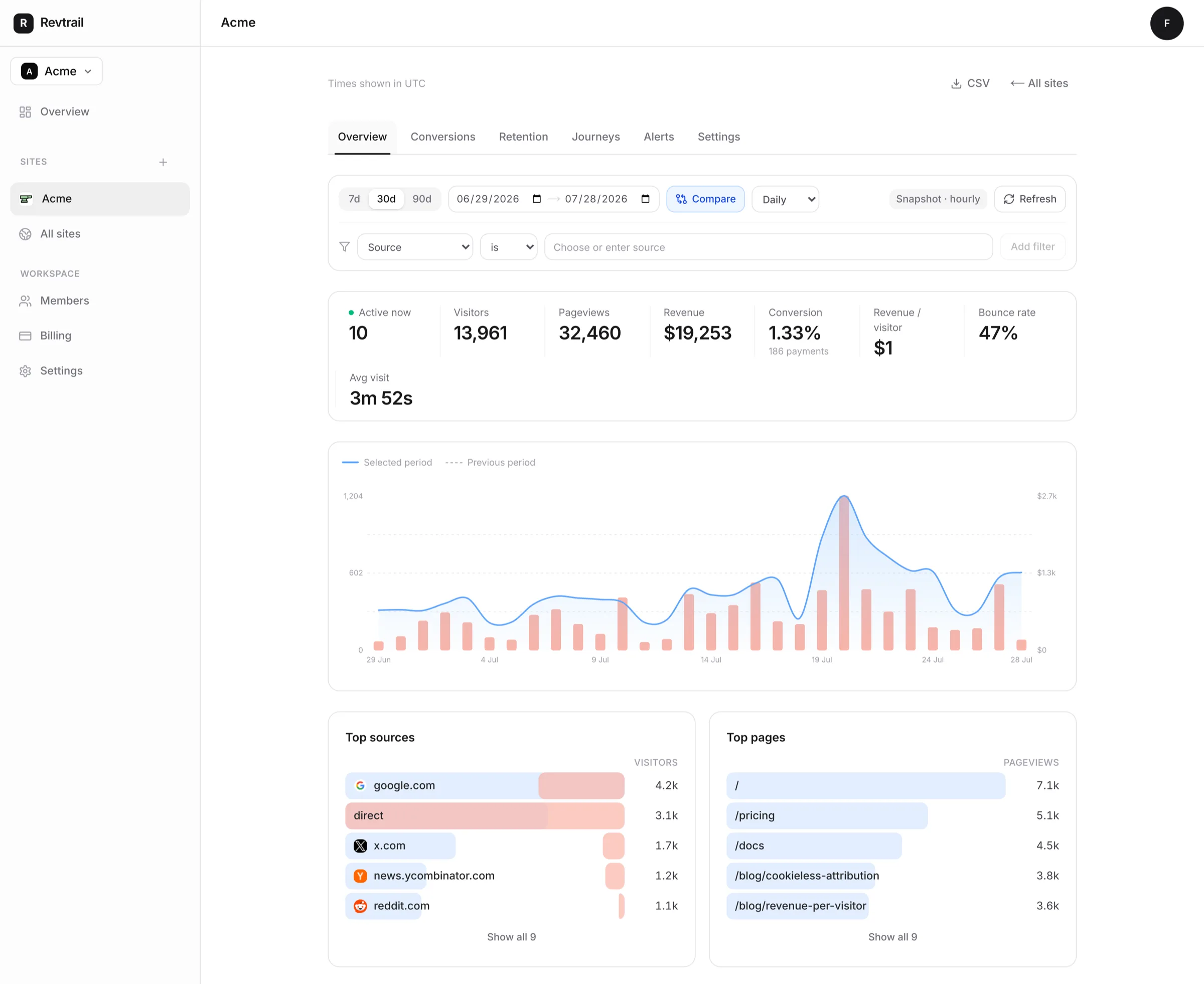
Know which channels bring in revenue.
Revtrail connects pageviews to signups and payments. One cookieless snippet shows which traffic sources make money, so you can spend more on what works.
No tracking cookies by default. Persistent identity is opt-in.
Works with your stack
Why Revtrail
Put revenue behind every marketing decision.
Revtrail follows the journey from first click to signup to payment. Every channel, campaign, and page gets a dollar value you can use to decide what to fund.
Revenue per channel
See how much revenue comes from Google, X, newsletters, and every other referrer.
Cookieless by design
A daily-rotating hash counts visitors without cookies or a stored browser ID. Persistent identity is an explicit opt-in.
Live by default
Active visitors and fresh rollups stream into the dashboard in real time, in every open tab.
One tiny snippet
Add one small script tag — about 3KB gzipped — and start collecting data. You won't need a tag manager or a week of instrumentation.
Why we built it
We built Revtrail because traffic alone could not tell us where to spend. The dashboard puts revenue next to every channel, and we use it to run our own products every day.
The Revtrail team — this site has tracked itself since day one.
Attribution →
Every payment, credited to the channel that earned it.
Revtrail connects first visit → signup → payment in one journey, then ranks channels by the revenue they produce.
First-touch journeys
The channel that first brought a visitor gets the credit when they eventually pay.
Verified payment events
Signed Stripe and RevenueCat webhooks attach payments to the right journey. Browser-supplied amounts are rejected.
Revenue per visitor
Compare what a visitor from each channel is worth.
UTM aware
Campaign, source, and medium are captured automatically from every landing URL.
Customer LTV
Repeat payments accumulate on the journey, so channels are ranked by lifetime value.
Goal funnels
Define signup and trial goals and see conversion per source at every step.
Anywhere
Works wherever your traffic lands.
The same snippet works on static sites, SPAs, and server-rendered apps. A typed API covers server-side events and reporting.
One-line install
Paste the snippet into your <head> and data flows in seconds. SPA navigation is tracked automatically.
Server-side events
Send custom events from your backend, and use a signed Stripe webhook for verified revenue.
Analytics →
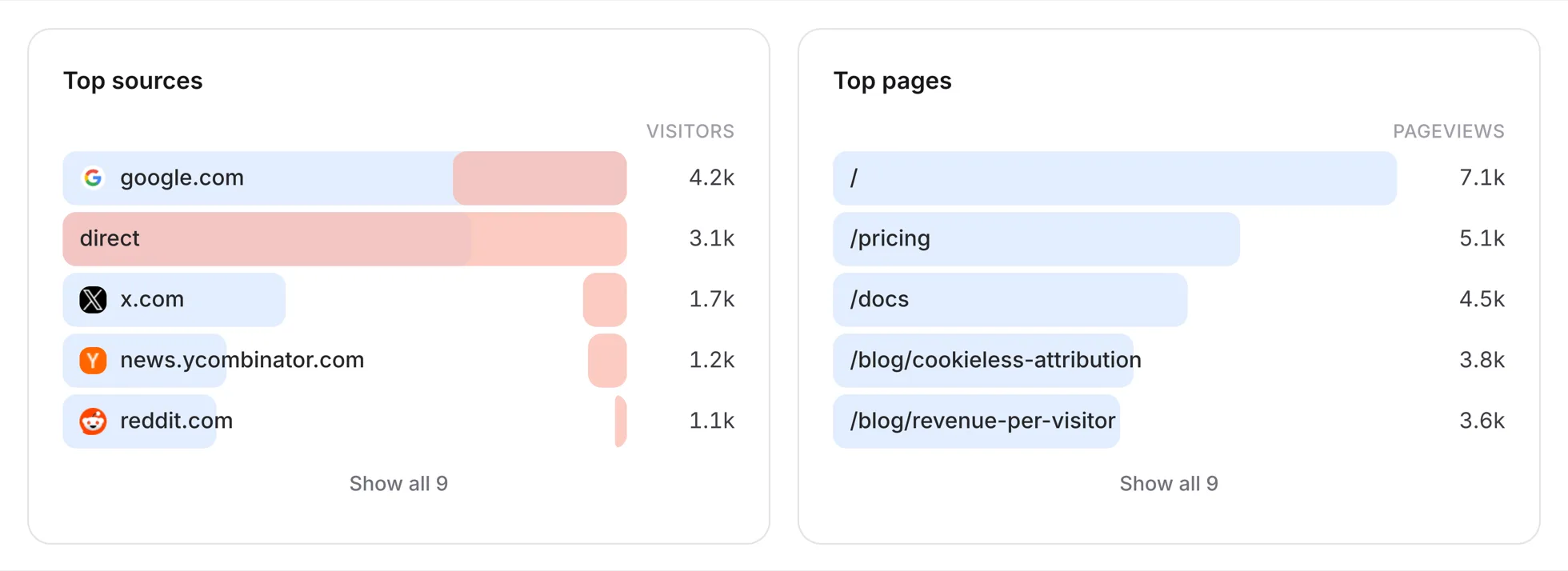
Everything you left Google Analytics for.
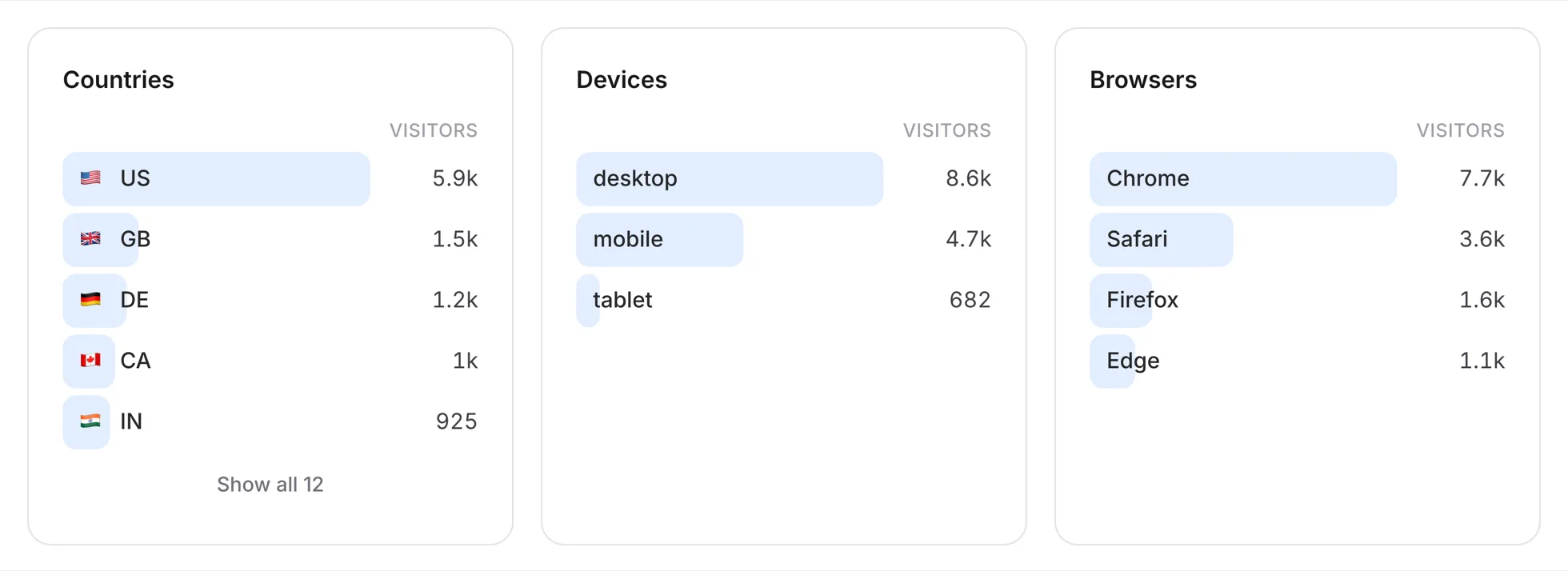
See pageviews, visitors, sources, countries, and devices in a dashboard you can read in ten seconds. It all comes from one cookieless snippet, about 3KB gzipped.
One-line install
Paste a script tag. SPA navigations are tracked automatically, no config.
Cookieless visitors
Daily-rotating hashes count people without cookies, fingerprinting, or banners.
Top pages + sources
The pages that convert and the referrers that send real customers, side by side.
Clients + devices
Separate web, mobile app, desktop app, CLI, and server activity, then break it down by device, browser, OS, and country.
Bot filtering
Known crawlers and headless traffic are filtered before they touch your numbers.
Fast by architecture
Events land in a columnar store built for billions of rows; dashboards read pre-computed rollups.
Realtime →
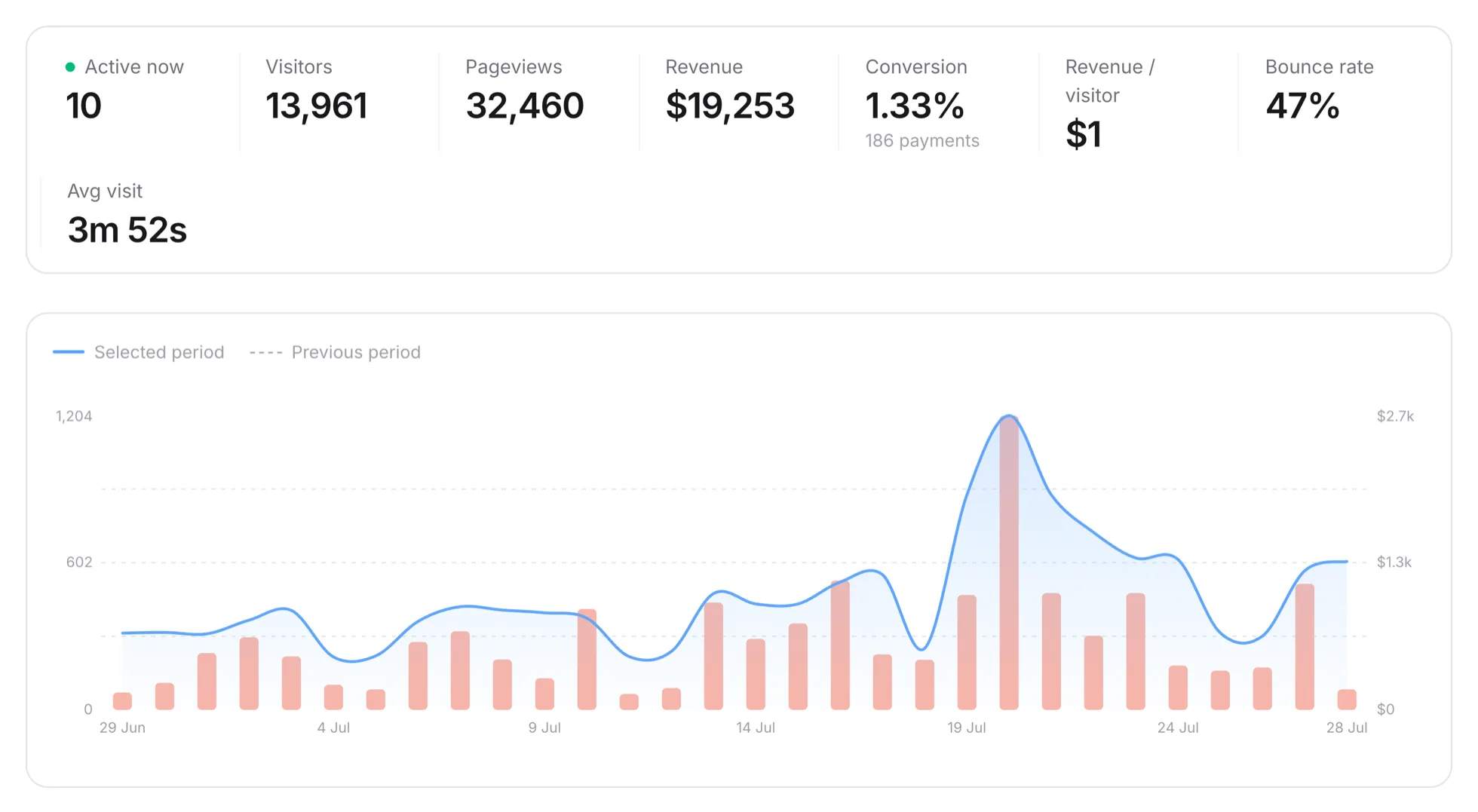
Your launch day, live.
Active visitors, conversions, and their sources stream into every open dashboard tab as they happen.
Active visitors
Who's on your site right now, updated every minute.
Live attribution
Watch signups get credited to the post or campaign that drove them.
Every tab in sync
Entity sync keeps every dashboard tab current without a refresh or polling.
AI visibility
See how often ChatGPT, Claude, and Perplexity read your site, down to the page.
Usage alerts
Get an email at 75% and 100% of your plan. Events keep recording after you reach the cap.
Zero setup
Realtime uses the same snippet, with nothing else to install or enable.
Attribution
Follow every visit through signup and payment.
A visitor lands, reads two pages, and leaves. Revtrail records the visit as the start of a journey, ready to connect with a later signup or payment.
Within a cookieless daily journey, signups and verified Stripe payments are credited to the channel that brought the visitor.
Install the snippet, pass its visitor ID into Stripe Checkout, and signed payment events join the journey automatically.
- 01The journey. Landing, signup, checkout, payment. Four moments stitched into one attributed path.
- 02Custom goals. Track signups, trials, and downloads as goals, each attributed to its source.
- 03Revenue events. Signed Stripe and RevenueCat webhooks add verified payments to the channel that earned them.
- 04Live view. Watch who is on your site right now, and which pages are converting today.
Goals →
From landing page to paying customer, step by step.
Define signups, trials, and purchases as goals. Then see where visitors from each channel convert or drop off.
Custom events
revtrail('signup') is all it takes to define a new goal from your code.
Conversion by source
Every goal broken down by the channel that delivered the converting visitor.
Funnel steps
Chain goals into funnels and find the exact step where journeys stall.
Cross-platform goals
Web and mobile fire the same event names, so one goal counts both.
Revenue on goals
Payment events carry real amounts, so funnels report dollars alongside conversion counts.
API events
Fire goals server-side with the API when the conversion happens in your backend.
▸ <script defer src="/track.js" data-site="a1b2…">
pageview → / · google.com · US
signup → /pricing · same visitor
payment · $49.00
attributed to google.com · first touch · 2 sessions · cookieless
▸ live rollup · refreshed just now
google.com → $49 revenue · 1 paying visitor
Get started
Tracking revenue in 60 seconds.
Create a workspace and try every feature for 14 days without a card. Installation takes one script tag.
- 01
Start your trial
Sign up with an email and choose the site and event allowances that fit your product.
- 02
Paste the snippet
Drop it into your <head>. Pageviews, sources, and live visitors start flowing immediately.
- 03
Connect verified revenue
Connect a signed Stripe or RevenueCat webhook. Revtrail rejects payment amounts sent by the public browser tracker.
Pricing
Choose sites and event volume.
Try every feature for 14 days without a card. Pay monthly or save two months with annual billing.
Starter
For one product or a small portfolio.
Billed monthly
- ✓100k events / month
- ✓3 sites
- ✓Unlimited members
- ✓3-year data retention
- ✓Custom goals + funnels
Growth
Most popularFor teams with many products or client sites.
Billed monthly
- ✓100k events / month
- ✓30 sites
- ✓Unlimited members
- ✓3-year data retention
- ✓Priority support
Scale
For products with higher event volume.
Billed monthly
- ✓1M+ events / month
- ✓30 sites
- ✓Unlimited members
- ✓3-year data retention
- ✓Priority support
No card required. Add a payment method before the trial ends to continue.
The team
Built by founders who needed it.
Revtrail exists because we got tired of guessing which marketing worked. Every feature earns its place by answering one question: did it make money?
A small team
A paying customer's need is enough to get a feature built and shipped.
Privacy first
Cookieless and GDPR-friendly by architecture. Revtrail measures journeys without building personal profiles.
Ships every week
Updates go out weekly, driven by what paying founders ask for.
Customer funded
Customer renewals fund Revtrail. If the product pays for itself, we both win.
Start tracking
Stop paying for traffic that never pays you.
Put a dollar value next to every channel and make the next spend decision from evidence. That's revenue-first analytics.
14 days free · No card required · Cancel anytime
Questions
Frequently asked.
Do I need a cookie consent banner?+
Revtrail's default daily mode sets no tracking cookies and stores no browser identifier. Persistent anonymous identity is an explicit opt-in. Your requirements still depend on your location and the other tools on your site, so confirm them with your legal adviser.
How does revenue attribution work?+
The snippet remembers the visitor's first source within its daily journey. A signed Stripe webhook credits verified payments to that source when Checkout carries the Revtrail visitor ID.
What counts as an event?+
Any data point the snippet records: a pageview, a custom goal, or a payment. Plans vary by monthly events and site allowance.
Can I import or export my data?+
The site-scoped Website API exports aggregate overview data and lets approved keys manage goals and funnels. Historical imports and visitor-level exports are not available yet.
Which plan should I choose?+
Choose Starter for up to three sites and 100,000 monthly events. Choose Growth for the same event allowance across up to 30 sites. Choose Scale for up to 30 sites and 1 million monthly events.
How does the 14-day trial work?+
Choose any plan and start without a card. Add a payment method before day 14 to continue. If you do not add one, Stripe cancels the subscription when the trial ends.
What happens when I reach my event allowance?+
Revtrail emails workspace owners at 75% and 100% of the monthly allowance. Upgrade before sustained overages so your plan matches the traffic you send.
Can I cancel or change plans?+
Yes. Use Billing to open the Stripe customer portal, change plans, update payment details, or cancel. A cancellation takes effect at the end of the paid billing period.